


AI Agent Dashboard
The main hub where you can view, filter, and manage all your AI Agents. Each agent card shows key performance metrics for the last 30 days.

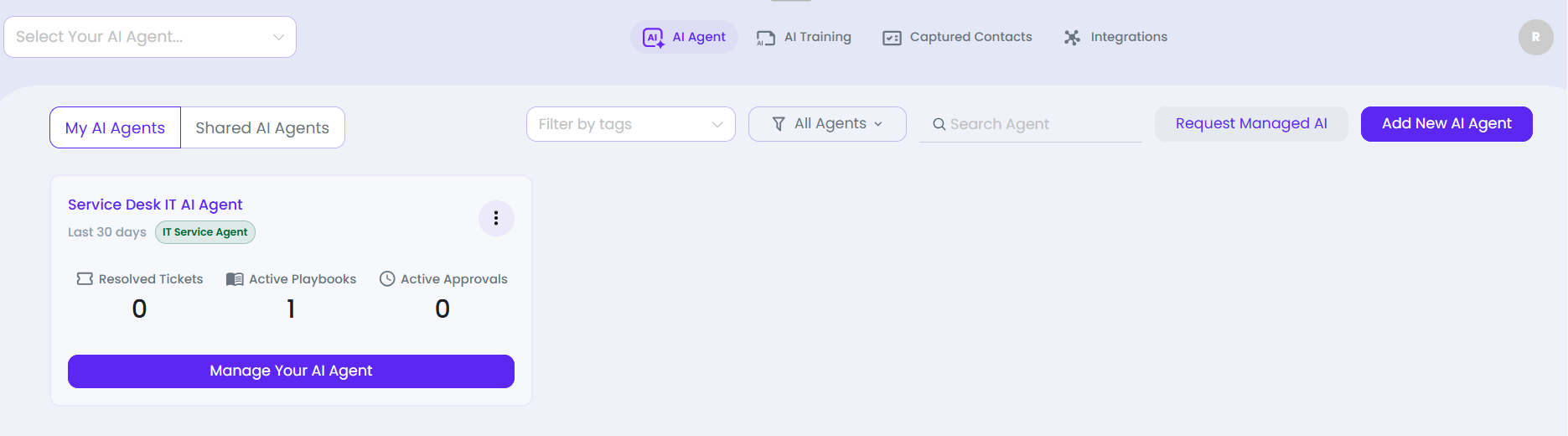
What you can do here
- Toggle between My AI Agents and Shared AI Agents tabs
- Filter agents by Tags using the tag dropdown
- Filter by agent type using the All Agents dropdown
- Search for a specific agent by name using the Search Agent field
- Click Request Managed AI to submit a managed agent request
- Click Add New AI Agent to create a new agent
- Click Manage Your AI Agent on any card to open that agent's management console
- Click the -- menu on any agent card for quick actions
- Switch agents using the Select Your AI Agent… dropdown in the top bar
Agent Card Metrics
| Metric | Description | Agent Types |
| Resolved Tickets | Tickets automatically resolved by AI in the last 30 days | IT Service Agent |
| Active Playbooks | Number of enabled playbook automations | All types |
| Active Approvals | Pending approval requests awaiting human sign-off | IT Service Agent |
| Connected Channels | Number of communication channels linked | Custom Agent |
| Platform Credentials | Number of connected platform credentials | Custom Agent |
| Total Visitors | Unique visitors that interacted with the agent | Web / Sales agents |
| Training Materials | Documents, URLs and images in the knowledge base | All types |
| Queries Served | Total conversations handled | Web / Sales agents |
| Avg Interaction Time | Average session duration per visitor | Web / Sales agents |
| Total Generated Content | Pieces of content produced by the agent | Content Marketing |
| Total Searched Keywords | SEO keyword lookups performed | SEO Page Finder |
| Total Trained URLs | Web pages indexed into knowledge base | SEO Page Finder |