


Agent Management — Playbooks
Create and manage automated workflow scripts that the AI agent executes when specific trigger conditions are met. Each playbook defines what the agent does step-by-step.

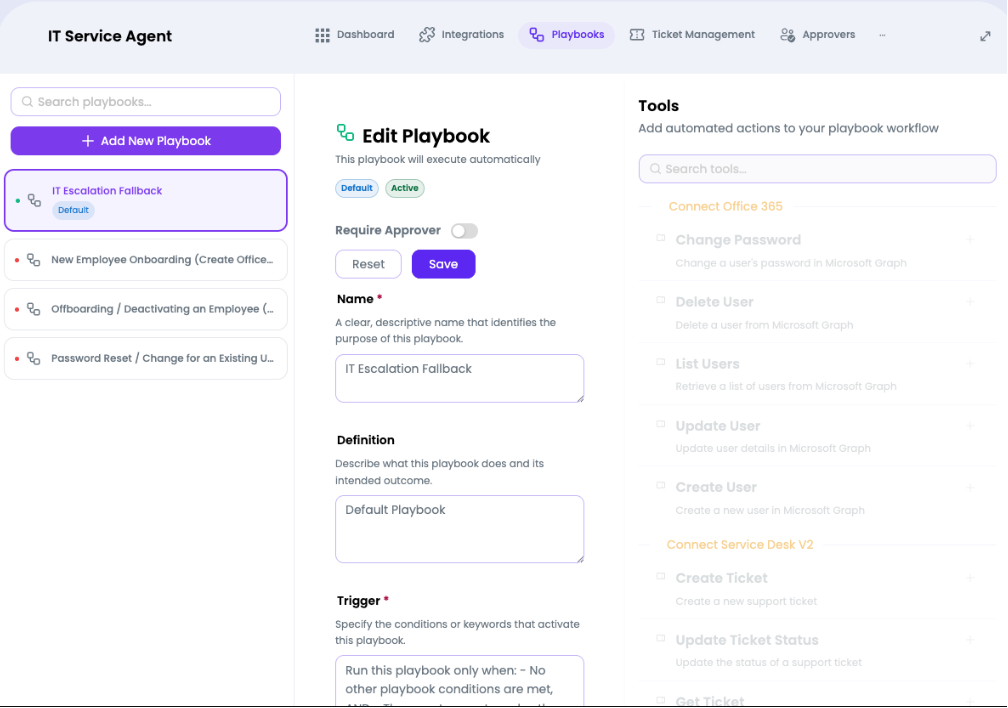
What you can do here
- Click Add New Playbook to create a new automation workflow
- Select any playbook from the left sidebar to open it in the editor
- Edit the playbook Name, Definition, and Trigger
- Enable/disable Require Approver toggle to enforce human sign-off before execution
- Add Tools from the right panel to give the playbook specific capabilities
- Search available tools using the Search tools… field
- Click Save to persist changes or Reset to revert
- Search existing playbooks using the top search field
Playbook Editor Fields
| Field | Description | Required |
| Name | A clear, descriptive name identifying the playbook's purpose | Yes |
| Definition | Describes what the playbook does and its intended outcome | Yes |
| Trigger | Conditions or keywords that activate this playbook | Yes |
| Require Approver | Toggle — when ON, a human must approve before execution | No |
| Status | Badge showing Active or inactive | Auto |
Available Tool Categories
| Integration | Example Tools |
| Connect Office 365 | Change Password, Delete User, List Users, Update User, Create User |
| Connect Service Desk V2 | Create Ticket, Update Ticket Status, Get Ticket |
Note: The Default playbook (marked with a badge) serves as the fallback when no other playbook conditions are met. It cannot be deleted.