


AI Training Materials — Repository Detail
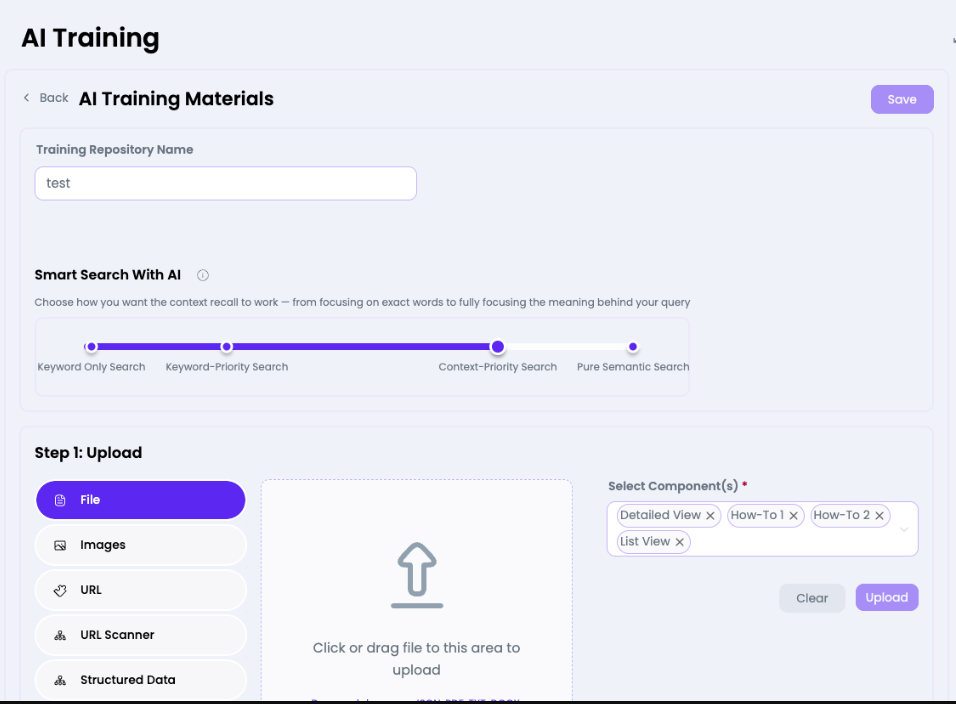
Edit a repository's training content. Upload files, add URLs, crawl websites, and configure how the AI searches this knowledge base using the Smart Search slider.

What you can do here
- Rename the repository in the Training Repository Name field
- Adjust the Smart Search With AI slider to configure retrieval behaviour
- Upload Files (PDF, DOCX, CSV, JSON, etc.) via drag-and-drop or click
- Upload Images to the knowledge base
- Add individual URLs for the AI to learn from
- Use URL Scanner to crawl and index entire websites
- Add Structured Data (JSON/CSV) for precise data retrieval
- Select Component(s) (Detailed View, How-To 1/2, List View) to associate content type
- Click Upload to ingest content, or Clear to reset
- Click Save to persist repository name/settings changes
Smart Search Settings
| Position | Behaviour |
| Keyword Only Search | Matches exact words — high precision, lower recall |
| Keyword-Priority Search | Keywords weighted higher than semantic meaning |
| Context-Priority Search | Semantic meaning weighted higher (recommended) |
| Pure Semantic Search | Fully meaning-based — ideal for conversational queries |
Note: Context-Priority Search is typically the best balance for most AI agent use cases — it understands the intent of a question even when exact keywords aren't used.