


Captured Contacts
A CRM-style contact database that automatically collects visitor information gathered by your AI agents during conversations.
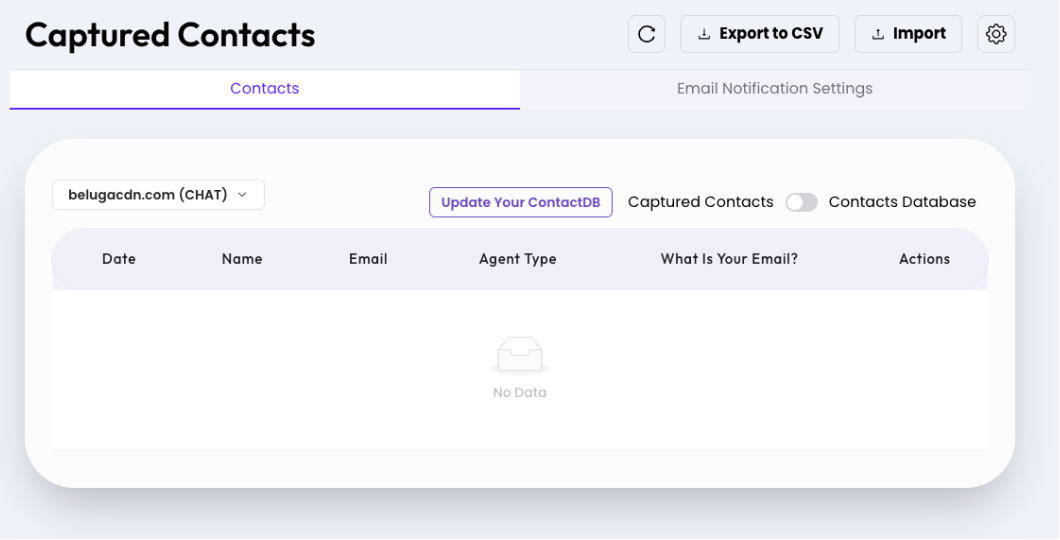

What you can do here
- Toggle between Captured Contacts and Contacts Database views using the switch
- Select which agent/channel to view contacts from using the site selector dropdown
- Click Export to CSV to download all contacts as a spreadsheet
- Click Import to upload contacts from a CSV file
- Click Update Your ContactDB to sync the contact database
- Click the refresh icon (↺) to reload the contact list
- Click the gear icon (⚙) to access contact settings
- Sort by column headers (Date, Name, Email, Agent Type)
Contacts Table Columns
| Column | Description |
| Date | When the contact was captured |
| Name | Visitor's name as provided in the chat |
| Visitor's email address | |
| Agent Type | Which AI agent collected this contact |
| What Is Your Email? | Custom field collected during conversation |
| Actions | View, edit, or delete individual contact records |
Captured Contacts — Email Notification Settings
Configure email alert preferences for your contact capture forms, including daily error summaries and additional notification recipients.

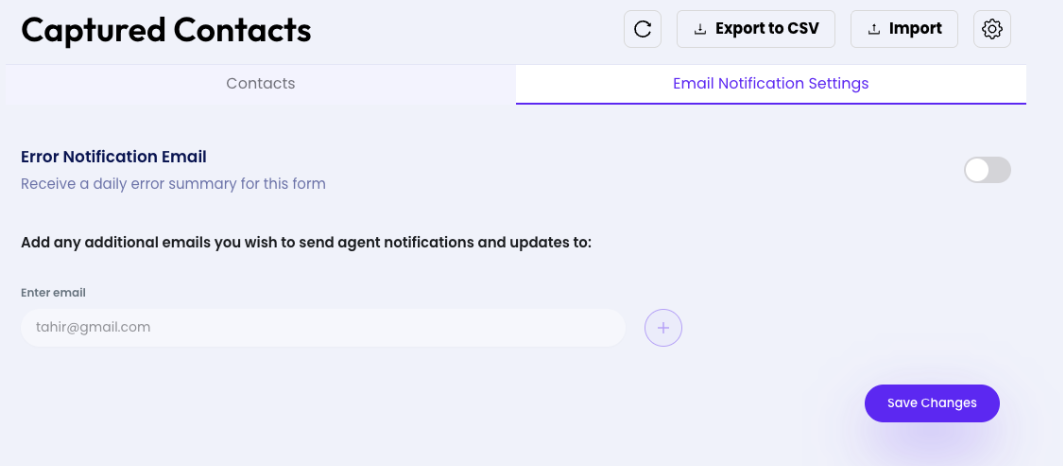
What you can do here
- Toggle Error Notification Email to receive a daily error summary for the contact form
- Add additional email addresses to receive agent notifications and updates
- Click the + button to add each new email address
- Click Save Changes to apply your notification settings
Fields
| Field | Description |
| Error Notification Email (toggle) | When ON, sends a daily digest of form errors to your account email |
| Enter email | Additional email addresses to CC on agent notifications |