
ITarian Help

Find the desired product help

Secure Internet Gateway

Secure Internet Gateway

Admin Guide Version

English

Print Help
Secure Internet Gateway > Configure > Manage Policies > Manage Domain Classification Requests > Website Category Reference
  • Secure Internet Gateway
    • Setup Wizard
      • Start The Setup Wizard
      • Step 1 - Add Your Network
      • Step 2 - Confirm Rules For Your Policy
    • Setup Guide
      • Set Up Your Network To Secure Internet Gateway
        • Step 1 - Add Network
        • Step 2 - Set DNS
        • Step 3 - Create Policy
        • Step 4 - Analyze
      • Set Up Your Roaming Endpoints
        • Step 1 - Download And Install The Agent
        • Step 2 - Anti-Tampering Password
        • Step 3 - Configure Policy
        • Step 4 - Analyze Logs
      • Protect Your Mobile Devices
    • Overview
      • View The Web Overview Dashboard
      • View The Security Overview Dashboard
      • Page Through Widgets And Change The Reporting Period
    • Reporting
      • View Web Activity Reports
      • Drill Into The 'Other' Slice On Top URL Categories
      • View Security Reports
      • View Mobile Activity Reports
      • View Local Resolver Activity Reports
      • View CCB Activity Reports
      • View And Manage Exports
    • Configure
      • Manage Policies
        • Create A Policy - Select Objects
        • Create A Policy - Settings
        • Update A Policy
        • Validate A Policy With Check Policy
        • Manage Domain Classification Requests
          • How Domain Classification Requests Work
          • Request A Category Change
          • Website Category Reference
      • Policy Settings
        • Manage Security Rules
          • Create A Security Rule - Name
          • Create A Security Rule - Settings
        • Manage Category Rules
          • Create A Category Rule - Name
          • Create A Category Rule - Settings
        • Manage Domain B/W Lists
          • Create A B/W List - Name
          • Create A B/W List - Settings
          • Block By Country Top-Level Domain
        • Manage Block Pages
          • Create A Block Page - Name
          • Create A Block Page - Single Page For All Blocked Domains
          • Create A Block Page - Different Pages Per Block Reason
          • Redirect Blocked Users To A URL
      • Objects
        • Manage Networks
          • Add A Network
          • Add A Network - Additional Settings
          • Add A Network With A Dynamic IP Address
        • Manage Roaming Devices
          • Set An Anti-Tampering Password
          • Download The Roaming Agent
          • Deploy The Roaming Agent Through Endpoint Manager
        • Manage Mobile Devices
          • Add A Mobile Device
    • Shadow AI
      • Shadow AI Summary
      • Discovered AI Tool Catalog
      • Top AI Devices, Mobile Agents And Networks
      • Recent AI Blocks
      • Export Shadow AI Data
      • Block AI Tools
      • How Shadow AI Counts Requests
    • View Account Information And Licences

Website Category Reference


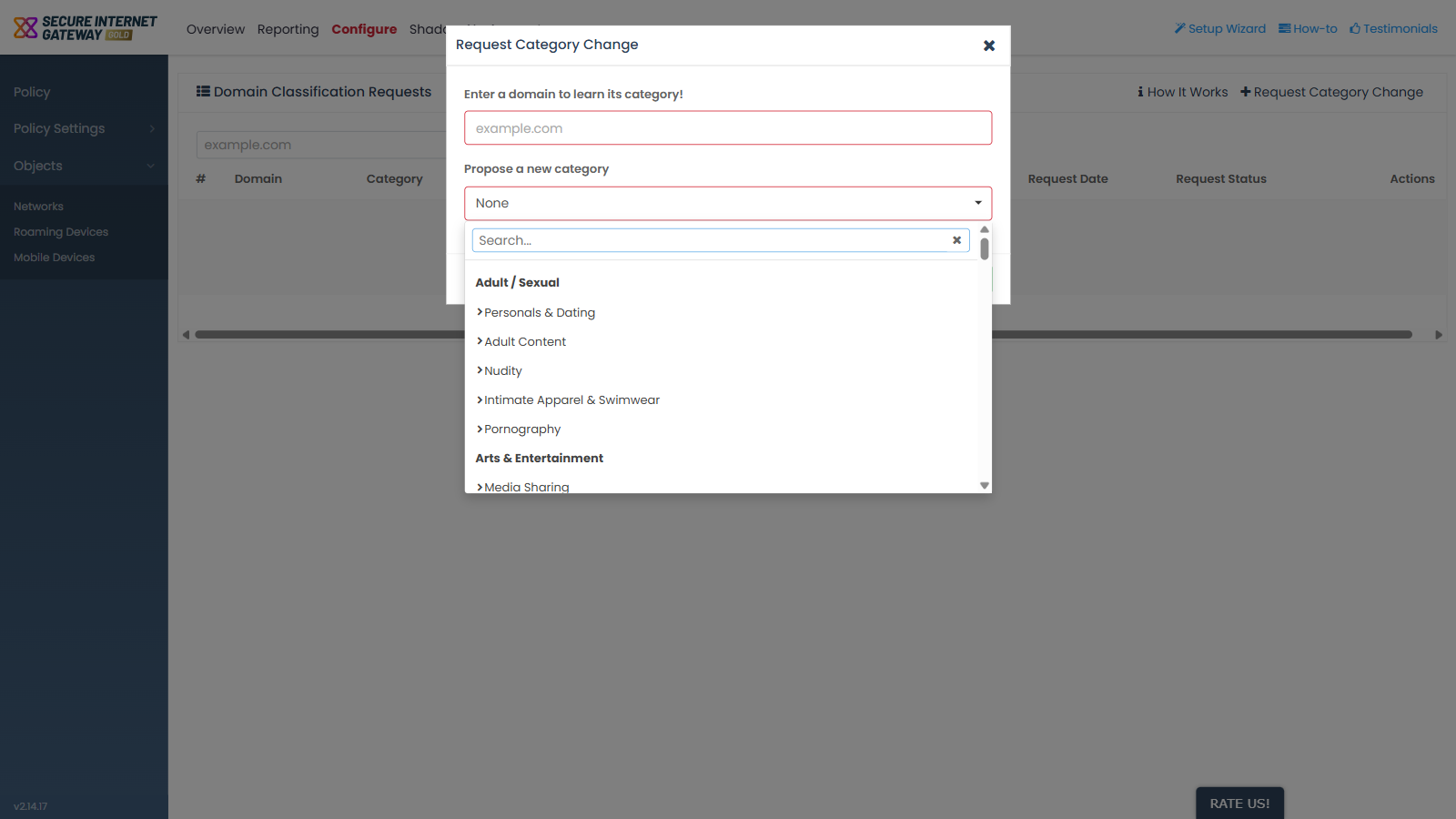
  • Click 'Configure' > 'Policy' > 'Domain Classification Requests' > 'Request Category Change' > 'Propose a new category' to open this list.


Secure Internet Gateway classifies every domain into a website category, and the categories are arranged in top-level groups. The same taxonomy is offered by the 'Propose a new category' selector here and by the 'Select Category' picker used to build a category rule.

Use this reference to find the group a category belongs to before you propose a change or build a rule.

Secure_Internet_Gateway_1.png

Groups and categories

Group Categories
Adult / Sexual Personals & Dating, Adult Content, Nudity, Intimate Apparel & Swimwear, Pornography
Arts & Entertainment Media Sharing, Entertainment, Streaming Media
Business Auctions & Classifieds, Advocacy-NGO, Finance & Investment, Marketing & Merchandising, Job Search & Career Development, Stock Trading
Computers Information Security, Computing & Technology, Online Services, Downloads, Advertisements & Popups, Software-Hardware, Proxies, Text-Audio only, Online Storage, Content Server, Search Engines & Portals, Visual Search, Peer-to-Peer
Cultures / Society Arts & Society & Culture
Drugs / Alcohol / Tobacco use or abuse Alcohol & Tobacco, Illegal Drugs/Alcohol/Tobacco use or abuse Education, Illegal Drugs
Education Education & Reference
Games Gambling, Game Playing & Game Media, Game-Cartoon Violence
Illegal Activities / Cheating Illegal Software, Tasteless & Offensive
Health & Medical Health & Medicine, Fashion & Beauty
News The group is listed without sub-categories.
Recreation / Hobbies Weapons, Motor Vehicles, Food & Dining, Hobbies & Recreation, Shopping
Personal Web Content & Social Networking Mobile Communications, Blogs & Wikis, Social Networking, Parked Sites, Moderated Forums, Kids Sites, Web Applications, Instant Messaging, Hosted Personal Pages, Forums & Newsgroups, Comics & Humor & Jokes, Chat, Professional Networking
Public Information Sports, Travel, Misc, Government & Legal, Religion, Political Issues, Technical Information, Real Estate
Shadow AI AI Data & Analytics, AI Website Builders, AI Voice & Audio Solutions, AI Legal, AI Healthcare, AI Generative Media, AI Document Chat, AI Development & Infrastructure, AI Design & UI, AI Computer Vision, AI Business & Operations, AI Assistants & Productivity, AI Agents & Automation

Note: the 'Select Category' picker used when building a category rule presents the same taxonomy with 19 groups and 98 entries, so it carries slightly more than the selector on this screen. Confirm against the screen you are documenting.

See 'Request a Category Change' to propose a different category for a domain, and 'Create a Category Rule - Settings' to block or allow whole categories.

Comodo Help
  • IT Platform:
  • Help
  • Scripts
  • Wiki
  • Forum
  • Developer
  • RMM
  • Patch Management
  • Service Desk
  • ITSM
  • Managed Service Provider
  • Managed Detection and Response
  • Ticketing System
  • Helpdesk
  • ITIL

Copyright 2026 Itarian